Building a Sequence
Sequences are built from a list of actions. Click + Add Action to add an action and select from the available types. This will open the settings for the just added action, including its name. After saving an action you can hover over an action and click the Edit icon (pencil icon) to change its settings. Actions can be rearranged by dragging the rearrange icon (far right). Actions can also be grouped for visual clarity (groups do not change the flow or function, but make it easier to organize and understand the flow of the actions); Add Action Group can be found in [⋮] after which actions can be dragged between groups.
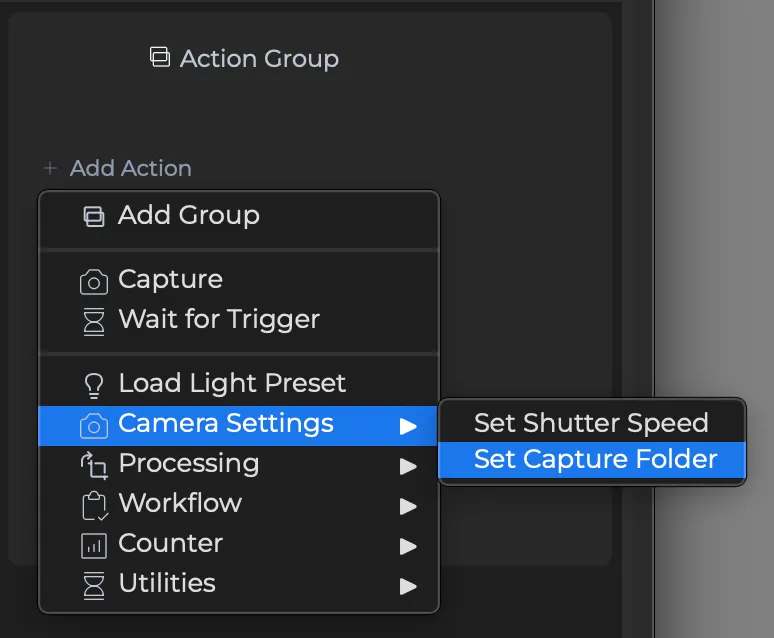
Action Types
Capture — Triggers a capture in Capture One. Choose a trigger mode (White, Fusion, or Direct) and optionally apply a light preset before capture and a Capture One style after. If no Stellar is connected, mode automatically falls back to Direct rather than failing.
Wait for Trigger — Pauses the sequence and changes the Trigger button (and foot pedal and keyboard shortcut command-K) into a "Continue" control. This is used in the Recto and Verso preset sequence to pause between captures of a two-sided workflow.
Load Light Preset — Applies a saved DT Nexus light preset at any point in the sequence, allowing lights to change mid-workflow without manual intervention.
Process File (Export) — Exports a captured file using Capture One. Format, bit depth, color profile, and output folder are supported.
AI Crop — Applies AI Crop to a captured image using an AI Crop preset.
Delay / Beep — Utility actions. Delay waits a configurable number of milliseconds before continuing; useful for self-timer workflows or pacing between steps. Beep plays an audio alert.
Counter Actions — Set, reset, increment, or decrement the Capture One capture counter. Useful for workflows where the counter drives naming conventions across recto/verso pairs. Note that increment and decrement adhere to the current counter increment, which can be set in Capture One. For example, if the counter increment is set to 4 in Capture One then using increment in a sequence will increase the counter by 4 while decrement will decrease the counter by 4.
Validate — Run the Validation report against a given FADGI or ISO standard, saving the PDF to a location of your choice.