AI Crop Energy Use: Operational and Training Estimates
Purpose
AI models have two energy costs: a one-time Training Cost paid by the model provider to train the model, and the Operational Cost of the end user to use it. This article provides a good faith estimate of both of these costs. They have not been independently vetted, but we have provided the technical details required for the reader to do so.
This article is not meant to minimize the global impact of widespread AI use. The use of AI in daily life, such as the five trillion Google searches conducted per year, are having a significant impact on energy use, energy prices, and global warming. However, it would be unwise to lump all uses of AI together; in some cases such comparisons are between a mountain and a molehill.
As detailed below, training our AI models each year takes the same electricity as charging a mid-sized electric car one time, and in production using AI Crop reduces the electric cost per image paid by the user to crop images.
Operational Cost (by end user)
Assumptions:
- 14-inch MacBook Pro M5, including its built-in display, CPU, GPU, memory, storage, Capture One, and charging loss. Active manual cropping requires only 6.0 Watts as the GPU and CPU are only lightly used. Active AI Crop requires 20 Watts as the GPU and CPU are heavily used.
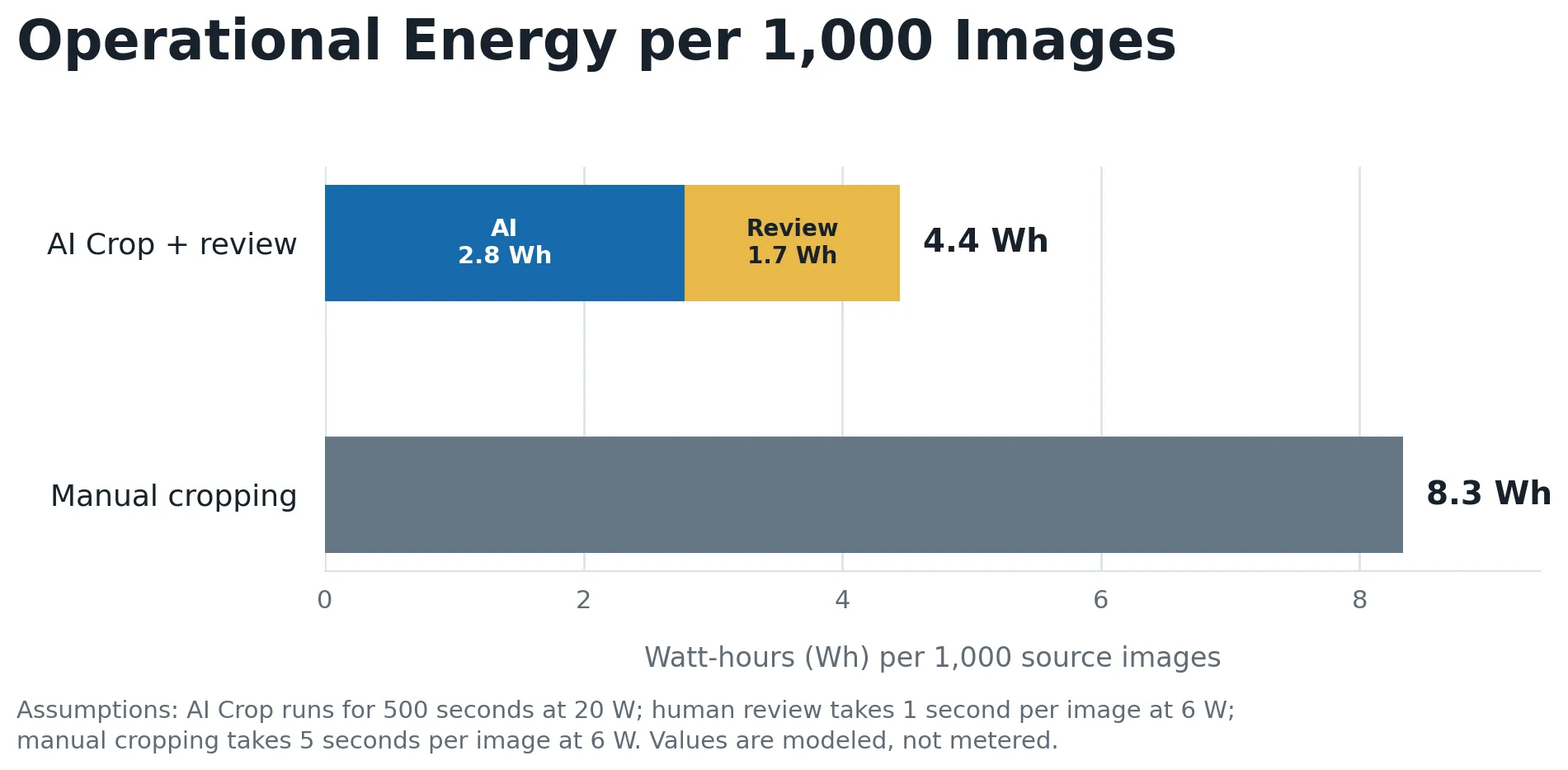
- AI Crop takes 500 seconds for 1000 images, plus 1 second per image of human review and remediation.
- Manual cropping is done at a rate of 5 seconds per image. This is likely an optimistic estimate for sustained production.
Results for a batch of 1000 images:
- AI Crop: 4.4 Watts
- Manual cropping: 8.3 Watts
Under these assumptions, AI Crop plus review uses around half the electricity of manual cropping. That is because using AI Crop uses more energy per second (the computer is working harder) but completes much more quickly; the additional time to run the computer for manual cropping ends up taking more total electricity.
Model Training (by DT)
Our 2025 and 2026 models were each trained at a Windows workstation with an NVIDIA RTX 5090. Each set of models took 7 days at approximately 80% GPU use.
Assumptions:
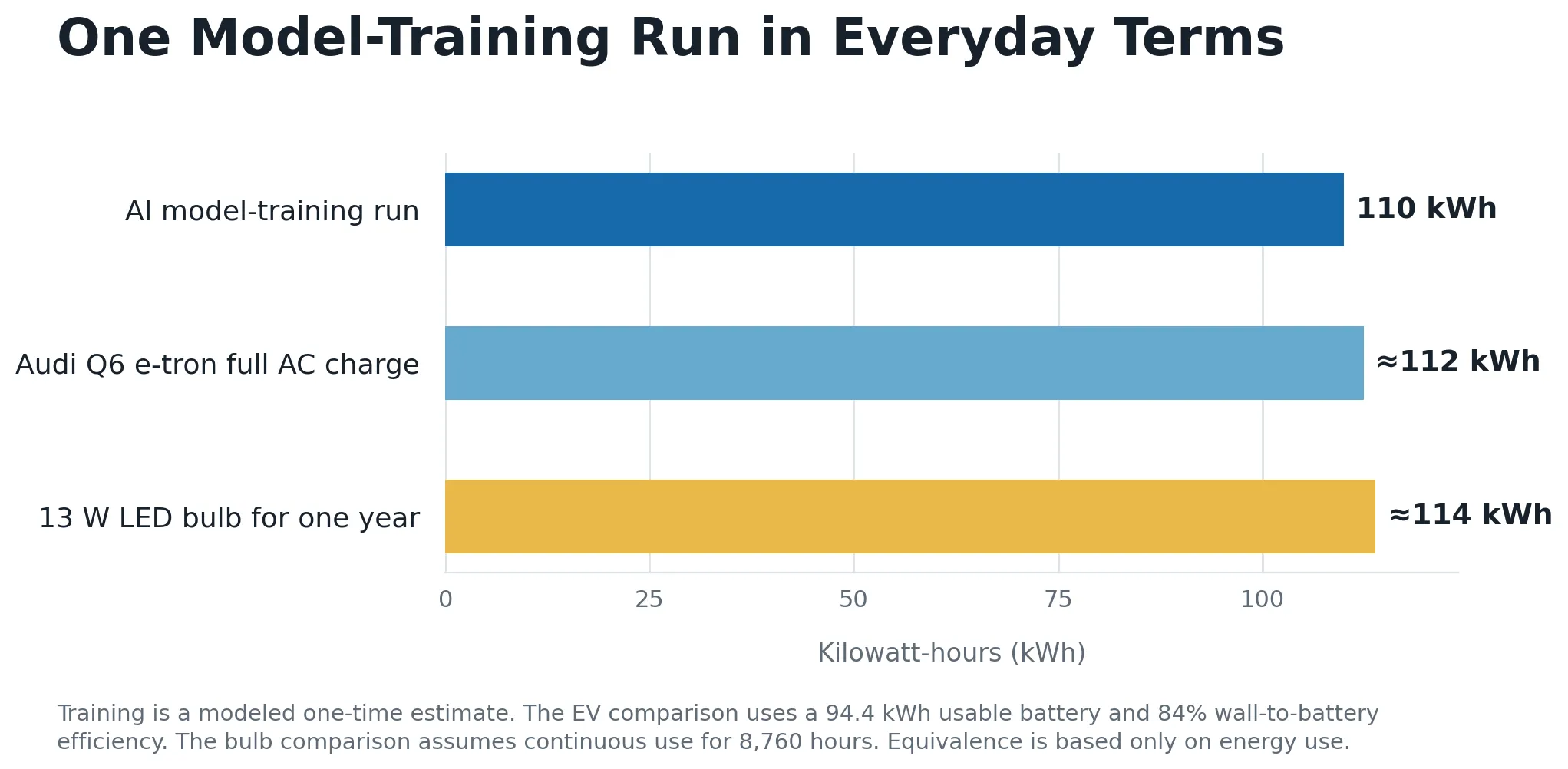
- NVIDIA GPU is spec'd at 575 W max power. Treating 80% use as 460 W average GPU-board power gives 77 kWh for the GPU alone.
- Rest of the computer is assumed to be 90 W, a display at 25 W, and PSU efficiency at 90%.
Result:
- 110 kWh to train the models each year. That's roughly similar to fully charge a mid-sized electric car one time or running a 13-watt LED bulb for a year.
Sources
Apple MacBook Pro (14-inch, M5) technical specifications: https://support.apple.com/en-gb/125405
Apple MacBook Pro 14-inch (M5) Product Environmental Report: https://www.apple.com/mideast/environment/pdf/products/notebooks/MacBook_Pro_14-inch_M5_PER_Oct2025.pdf
NVIDIA GeForce RTX 5090 specifications: https://www.nvidia.com/en-us/geforce/graphics-cards/50-series/rtx-5090/