Language
DT Nexus can be used in these languages:
- English (the default)
- Español
- Français
- Magyar
- Português (Brasil)
- Deutsch
Changing the Language from the Menu Bar
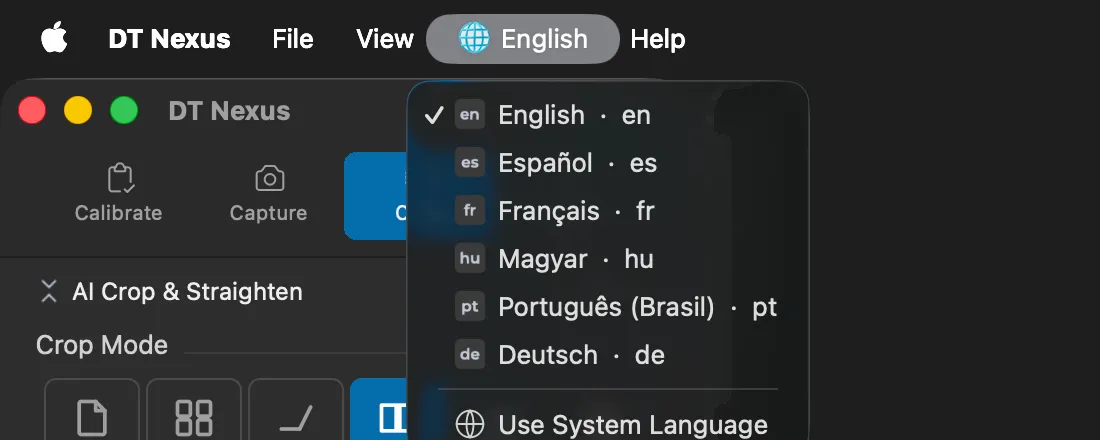
The globe menu in the menu bar, between View and Help, is named after the current language, for example 🌐 English. Each language is listed in its own name, followed by its code, for example Español · es.
Choose a language to switch to it. The change applies and is saved at once. You do not need to restart DT Nexus, and you do not lose any work.
If the Preferences window is open with a language change that you have not saved, DT Nexus asks you to save or cancel it first.
Changing the Language in Preferences
Open DT Nexus > Preferences and select Language.
Under Interface Language, choose a language.
Click OK. The new language applies at once.
Use System Language
Use System Language follows the order of preferred languages in macOS (System Settings > General > Language & Region). DT Nexus uses the first language in that list that it supports. If none of them is supported, it uses English.
What Stays in English
The launch screen and a few messages shown while DT Nexus starts are in English whatever language you choose. Names such as Babylon and Alexandria are not translated.